

Your Harmonia Profile: a short guide
Your harmonia profile brings together your job preferences, experience, training, and professional registration status, and is displayed alongside your CV when you apply for roles.
Completed, visible profiles are also matched to suitable roles that align with your experience.
Harmonia verified profiles
Professional registration helps employers quickly understand your qualifications and scope of practice, and is often an essential requirement on job descriptions for mental health professionals.
If you’re thinking abut changing careers, about to start training, or already a student member, you’re still invited to join Harmonia.
Verification is optional and you can still apply for many roles without it. We share placements, entry-level roles, guidance and career resources to support you at every stage of your journey.

How to find your profile
When you first register and complete your basic information, you’ll be taken directly to your Harmonia Profile.
If you’ve logged out, simply log back in and you’ll be taken to your dashboard, where you can access your profile at any time.
If you haven’t verified your email address yet, check your inbox for the verification email or request a new one before continuing.
Profile Settings
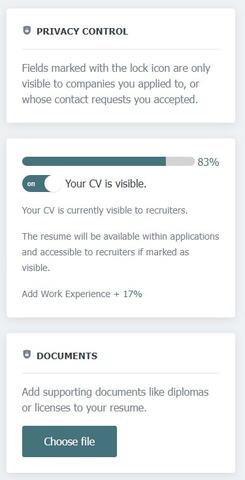
On the right hand side of your profile, you will see the following sections:
- Privacy Control: To make your personal data secure, fields marked with the lock icon are only visible to recruiters if you submit an application using the internal apply system.
- CV visibility: You can decide if you want your profile to appear on the CV database and within applications.
- ON - your profile is visible within applications and on the CV search
- OFF - your profile will not be included in submitted applications and is not available on the CV search
- Documents: Documents saved to your application profile are for your reference only and are not submitted within applications. When submitting an application, you can select the documents to include from your Saved Files, or attach an external document, such as an Application Form or Cover Letter.

Editing sections
Each section of your profile can be edited by clicking on the Edit or Add buttons.
- Clicking the edit icon will open the section
- Fields marked with an asterisk (*) are mandatory
- Remember to click 'submit' when you are finished to save the changes to the section.
- Once saved, you can create and save more qualifications or work experience details by clicking Add +
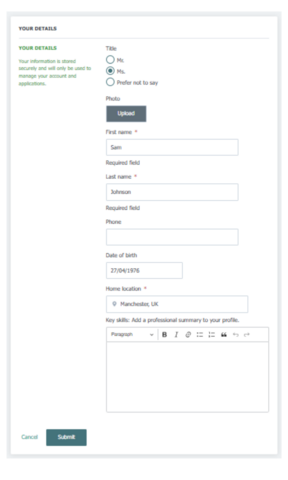
Your details
Add your basic information to set up your Harmonia Profile. This information is used securely to manage your account and support applications.
Key skills & professional summary
Use this space to highlight your main skills, experience and areas of focus. This helps employers and the Harmonia team quickly understand your background.
If you submit your profile for verification, our team will update your photo and verification status in this section.
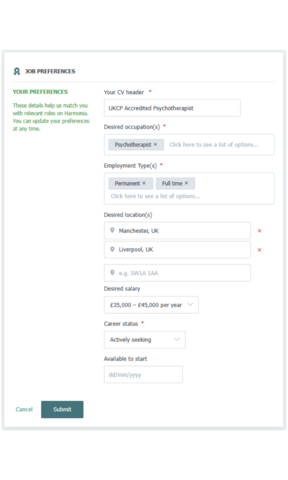
Job Preferences
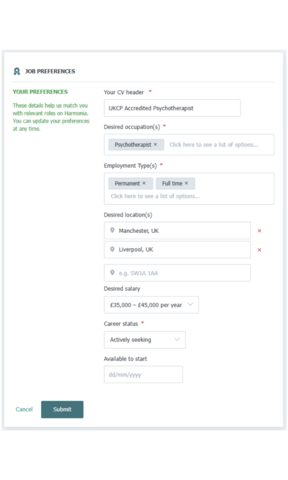
These details help us understand the types of roles you’re looking for and improve role matching on Harmonia. You can update your preferences at any time.
- Profile header: Use a clear title that reflects your desired role or registration status, for example your profession or area of practice.
- Desired occupation(s): Select the roles you’re interested in so we can match you to relevant opportunities.
- Employment type(s): Choose how you’d like to work, such as permanent, contract, full-time or part-time.
- Desired location(s): Add the locations you’re open to working in. You can include multiple areas or postcodes.
- Desired salary: Select your preferred salary range. This helps us match you to suitable roles.
- Career status: Let us know whether you’re actively seeking, open to opportunities, or just browsing.
- Available to start: Add your availability if you have a start date in mind.
If your profile is switched to visible, we can contact you about opportunities that align with your preferences.
Training & qualifications
Add details of your education, qualifications and relevant training. This helps employers and our team understand your background and supports role matching.
- Training provider: Enter the organisation or institution where you completed your training or qualification.
- Level of study: Select the level that best reflects your qualification.
- Course title: Add the name of your course or qualification.
- Location: Enter the location of your training provider.
- Time period: Add the dates you studied. If you’re currently in training, select until today.
- Summary: Use this space to briefly describe the focus of your training, any specialisms, or relevant placements.
When you're finished, submit to save and add another.
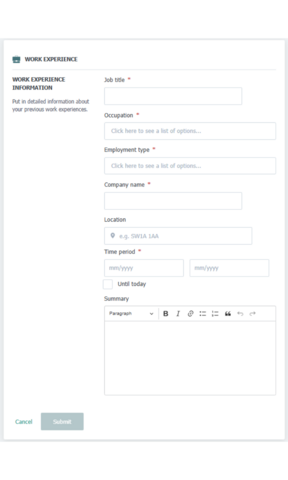
Work experience
Add details of your previous and current roles. This helps employers and the harmonia team understand your experience and suitability for roles.
- Job title: Enter the title you held in this role.
- Occupation: Select the occupation that best reflects the work you carried out.
- Employment type(s): Choose the employment type, such as permanent, contract, full time or part time.
- Company name: Add the name of the organisation you worked for.
- Location: Enter the location of the role.
- Time period: Add the dates you worked in this role. If you’re currently in the position, select until today.
- Summary: Use this space to describe your responsibilities, areas of focus and relevant experience. Keep it clear and concise, focusing on what’s most relevant to mental health and wellbeing roles.
When you're finished, submit to save and add another.
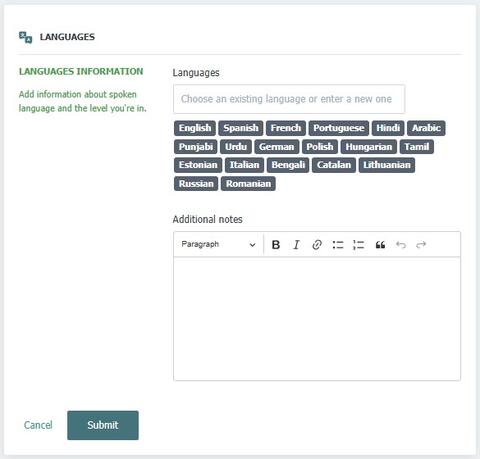
Languages
Listing your language skills, especially if you are bi- or multi-lingual, shows employers you can communicate with a wider range of people, build rapport with diverse clients, and support inclusive services.
Languages: Choose an existing language or enter a new one
Additional notes: Use this section give details of your proficiency level
- Example:
- Urdu – Fluent; regularly communicate with Urdu-speaking service users and families.
- British Sign Language (BSL) – Level 2; able to conduct group therapy sessions for Deaf clients and liaise with interpreters when needed.
- Spanish – Conversational; can provide initial triage and basic wellbeing support to Spanish-speaking callers to crisis helpline.
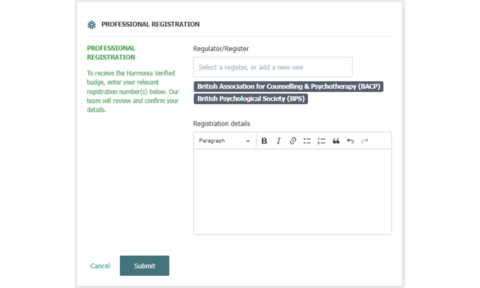
Professional Registration
Add your professional registration details if you’re registered with professional body that hold a PSA accredited register.
Once submitted, our team will review your information and cross-check it against live professional registers. If your details match, your profile will be marked as verified, shown by a verification badge on your profile.
Harmonia verified profiles are added to our registered professionals database and considered for exclusive opportunities and role matching.

Download your profile
- Click on the 'Print' button at the top of your profile
- This will open a new window
- Ensure the file destination is 'Save as PDF'
Create a free professional CV
Alternatively, you can use the free CV wizard from JobLookup to create a formatted CV in minutes.